





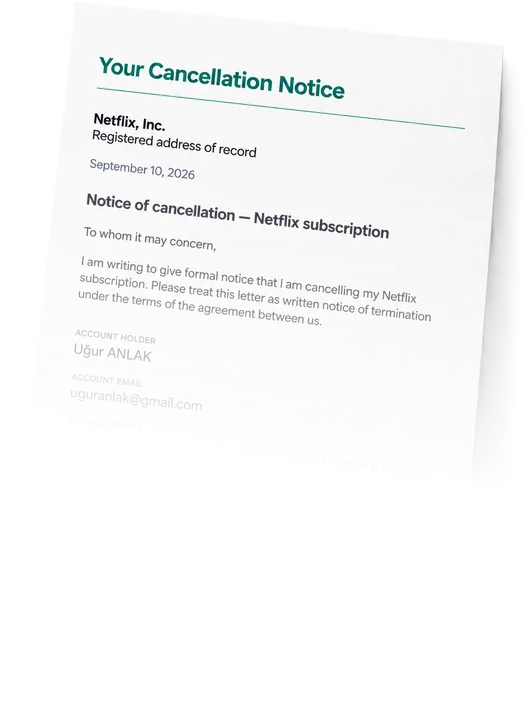



A written record, timestamped
You get a dated copy of exactly what was sent and when. If the provider bills you after that date, that copy is what your bank wants to see.


 Software & AI
Price varies by purchase; check your receipt
Start with the receipt for the charge labelled Vibestreet Studios. We have not verified a matching app or direct billing portal, so identify the actual app and biller before cancelling.
Cancel SubscriptionSend Cancellation Letter to Vibestreet Studios · no password required
Open Google Play with the Google Account used for the purchase.
Tap your profile, then Payments & subscriptions > Subscriptions.
Find the app identified on your purchase receipt; the subscription may use an app name rather than Vibestreet Studios.
Choose Cancel subscription and complete every confirmation prompt.
Save the confirmation and check the subscription end date. If it is missing, check your other Google Accounts and the receipt.
Your purchase receipt is from Google Play. Use this route even if you now use an iPhone or a browser.
No call, no retention script, no hunting for a cancel button that moved. You fill in one form; the rest is ours.
Choose a service and add your account details. No password needed.
We prepare a formal cancellation notice using your account details.
We send the notice on your behalf and email you a dated copy.
That difference only matters once — when a charge appears after you cancelled, and you need to show a date.
You get a dated copy of exactly what was sent and when. If the provider bills you after that date, that copy is what your bank wants to see.

You never speak to anyone. A written notice skips the save offers, the hold music and the chat agent whose job is to talk you out of it.

Every notice also asks the provider to delete personal data it no longer needs. The provider decides what it can delete and what it must retain.

If Submo fails to send your notice, we refund our fee in full. We can't promise what the provider will do — nobody can — only what we do.

A written notice records your request; it does not cancel a subscription by itself. Complete the cancellation with the billing provider on your receipt and keep its confirmation.
Apple and Google Play purchases must be managed through the relevant store. For a direct web purchase, use the verified merchant contact on your receipt and confirm that renewal has stopped.

Two different questions get mixed up here. The first — money back for a period you paid for and won't finish — is entirely Vibestreet Studios's decision under its own refund policy. You can ask for it on the form and the request goes into the notice, but it remains a request.
The second is a charge taken after your cancellation was effective. That isn't discretionary and isn't really a refund: it's a disputed charge, and your card issuer can reverse it. The dated notice is the evidence that supports the dispute, which is the main practical reason to send one at all.
Your purchase receipt is from Google Play. Use this route even if you now use an iPhone or a browser.
Open Google Play with the Google Account used for the purchase.
Tap your profile, then Payments & subscriptions > Subscriptions.
Find the app identified on your purchase receipt; the subscription may use an app name rather than Vibestreet Studios.
Choose Cancel subscription and complete every confirmation prompt.
Save the confirmation and check the subscription end date. If it is missing, check your other Google Accounts and the receipt.
Your purchase receipt is from Apple. Use this route only for an Apple-billed subscription.
Open Settings on your iPhone or iPad, tap your name, then Subscriptions.
Select the app identified on your purchase receipt; the subscription may use an app name rather than Vibestreet Studios.
Tap Cancel Subscription (or Cancel Free Trial) and confirm.
Check for an expiration date. If there is no cancel button and an expiration message is shown, Apple says it is already cancelled.
If you cannot find the subscription, check the Apple Account on the receipt; a purchase billed by another company must be cancelled with that company.
Your receipt shows a direct website purchase rather than Apple or Google Play. The merchant behind this billing name has not been verified.
Locate the original receipt and identify the app or service, merchant website, purchase email and billing provider. Vibestreet Studios may be a billing or developer name rather than the app title.
If the receipt is from Google Play or Apple, use that store’s cancellation route instead, even if you made or manage the purchase in a browser.
For a direct web purchase, use the verified merchant link on your receipt to find subscription management. If no cancellation option is available, contact the support listed on that receipt and request that renewal be stopped.
Ask for written confirmation and the access end date. Keep the reply and verify the renewal status; a support request alone does not confirm cancellation.
Sample reviews, illustrative photos

“I manage all my subscriptions and spendings with Submo”
“I found my hidden subs and cancelled them with Submo”
“Finally I am able to get refund for my unused subscriptions”
What to expect before you send the notice.
Use the route matching your purchase receipt. Google Play purchases are managed in Google Play subscriptions, Apple purchases in Settings > your name > Subscriptions, and direct web purchases with the verified merchant on the receipt.
Deleting an app does not cancel a store subscription. Finish the cancellation with the biller and retain confirmation.
You fill in one form with the name, address and email on the account. Submo composes a formal written cancellation notice from those details, addressed to the provider's record, and sends it on your behalf. You get a dated copy for your files. We never sign in to your account and never ask for your password.
The form takes about two minutes. Your notice is reviewed and dispatched by a person on our side — that review is deliberate, because a notice sent to the wrong entity is worse than no notice. Providers then process cancellations on their own timetable, commonly within a few business days.
No, and be wary of anyone who says otherwise. A cancellation notice exercises a right you already have under your agreement, and it creates a dated record that you exercised it. That record is what makes a bank dispute straightforward if billing continues. What the provider does next is the provider's decision.
Send your dated copy of the notice to your bank or card issuer and dispute the charge. A written notice with a date on it is exactly the evidence a chargeback needs, and it is the main practical reason to send one rather than clicking a button with no record.
$19.99 per cancellation notice, charged once. Each provider gets its own notice at the same price, and no membership or subscription is required. If we fail to send your notice, we refund the notice fee in full.
No. That is the point of a written notice — it works when you've lost the password, lost access to the email, inherited Vibestreet Studios from someone else, or simply can't find the cancel button. We identify the account from the name, address and email you give us.
We collect only what the notice needs: your name, postal address and the email on the account. Card details go directly to Stripe and never touch our servers. We don't sell data.
Yes, up to 5 on a single request. Add them with "Add another" on the form and each provider gets its own notice.
Find cancellation steps, billing routes and refund details for your other subscriptions.
Browse all cancellation guides ChatGPT PlusHow to Cancel ChatGPT PlusSoftware & AI
 Adobe Creative CloudHow to Cancel Adobe Creative CloudSoftware & AI
 Duolingo SuperHow to Cancel Duolingo SuperSoftware & AI
 Business InsiderHow to Cancel Business InsiderNews
 NetflixHow to Cancel Netflix
 Streaming
 Spotify PremiumHow to Cancel Spotify Premium
 Music & audio
 Disney+How to Cancel Disney+Streaming
 HuluHow to Cancel HuluStreaming
See what you pay for and decide what deserves to stay.